Procédure
Service concerned: external domain name, shared LWS web hosting and e-mail
Panel concerned: LWS Panel
Level: intermediate
Do you own a domain name with another provider and want to use it with an LWS service?
You can do this without necessarily transferring the domain to LWS. Simply change its DNS configuration so that it points to your web hosting, your e-mails, or all of your LWS services.
This help article gives you [PERSON_NAME] possible options: use the LWS DNS servers or modify only certain DNS records at your current provider.
Linking an external domain to LWS does not mean transferring the domain to LWS.
The domain can remain with your current provider while still using LWS web hosting or an e-mail service.
Choose the right method
Before modifying [PERSON_NAME], choose the method best suited to your situation.
If you want to manage the domain’s entire DNS zone from LWS, use the LWS DNS servers. This method lets you centralize management of the site, e-mails, and other DNS records in your LWS customer area.
If you only want to connect a specific service to LWS, for example the website or e-mails, keep the current DNS servers and modify only the required DNS records at your provider.
Use the LWS DNS servers if you want to entrust all DNS management for the domain to LWS.
Modify only the DNS records if you want to connect only the website, e-mails, or a specific service while keeping the DNS zone with your current provider.
Before you begin
Make sure you have access to the interface of the provider where the domain is currently managed. This is where you will need to modify the DNS servers or DNS records.
Before pointing the domain to LWS, also make sure the relevant LWS service is ready:
- if you want to display a website, the site files must be present on the LWS hosting account;
- if you want to use [ADDRESS] e-mails, the required e-mail addresses must [PERSON_NAME] ;
- if you want to keep certain services with the former provider, their DNS records should be noted before making any changes.
Changing a domain’s DNS servers switches the website, e-mails, and other services to the LWS DNS zone.
Before modifying the DNS, make sure your website is ready on LWS and that your required e-mail addresses already exist.
Method 1: use the LWS DNS servers
This method consists of replacing the domain’s current DNS servers with those of LWS. Once the change is made, the domain’s DNS zone will be managed from your LWS customer area.
1. Retrieve the LWS DNS servers
The LWS DNS servers are listed in the confirmation email received when the service was ordered.
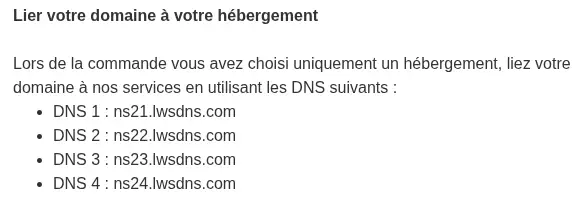
[PERSON_NAME] the email is no longer available, you can retrieve the information from your customer area.
Log in to your LWS customer area, then open the management page for the relevant service.
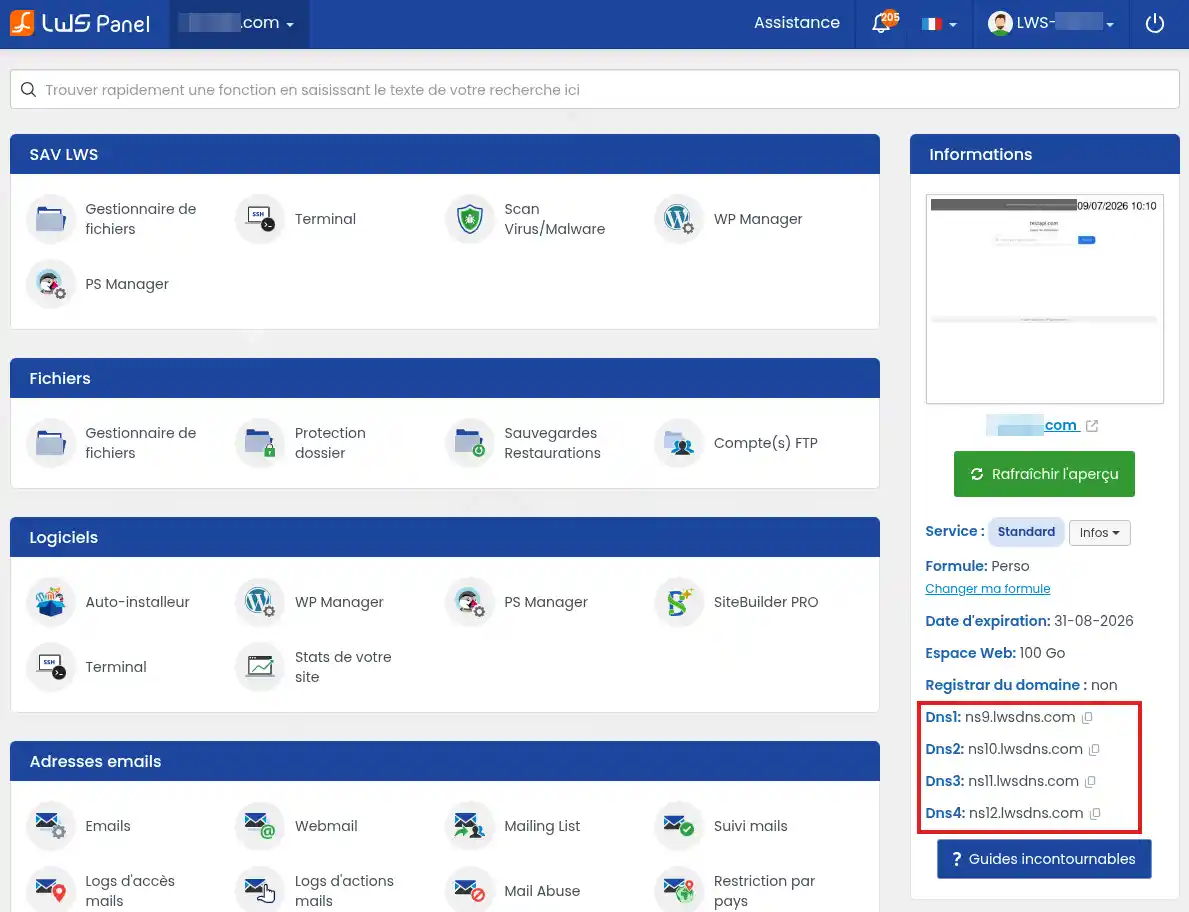
They usually appear in the following form:
ns1.lws-hosting.biz
ns2.lws-hosting.biz
ns3.lwsdns.com
ns4.lwsdns.com
The exact DNS servers may vary depending on your plan. Always use the values indicated in your customer area or in the email associated with your service.
2. Change the DNS servers at your provider
Log in to the interface of the provider where the domain is registered.
Look for the section related to DNS servers. Depending on the provider, it may be called DNS Servers, Nameservers, Domain DNS, DNS Management, or DNS Delegation.
Replace the current DNS servers with the LWS [ADDRESS] DNS servers, then validate the change.
If a domain transfer is already in progress, it may no longer be possible to change the DNS servers until the transfer is complete. In that case, wait until the transfer is finished or use method 2 by modifying only the DNS zone records.
3. Wait for DNS propagation
After validation, the change is not always visible immediately. Internet service providers and DNS servers may temporarily keep the old configuration.
After a DNS change, it may take several hours before the change is visible everywhere. In some cases, full propagation may take up to 24 to 48 hours.
Method 2: modify only the DNS records
This method keeps the DNS zone with your current provider while directing only certain services to LWS.
It is useful if you want, for example:
- to display only your site hosted at LWS;
- to use only LWS e-mails;
- to keep other services active with your current provider.
Link the website to LWS hosting
To display your LWS site with your external domain, you need to modify the DNS record that points to the web server.
In your LWS customer area, retrieve the IP address of your hosting. [PERSON_NAME] indicated in the DNS Zone section.
At your current provider, open the DNS zone for the domain, [PERSON_NAME] an A type record. [ADDRESS] support service if you need help.
[PERSON_NAME] :
Name: @
Type: A
Value: IP address of your LWS hosting
To make the address with www work as well, also check the www record.
Depending on your provider’s configuration, it may be:
Name: www
Type: CNAME
Value: your-domain.fr
or:
Name: www
Type: A
Value: IP address of your LWS hosting
Replace your-domain.fr and the IP address with the values corresponding to your domain and hosting.
Link the e-mails to LWS
To use LWS e-mails with your external domain, you need to modify the domain’s MX records.
In your LWS customer area, retrieve the MX values indicated for your mail service. Then create the required e-mail addresses before modifying the DNS zone.
You will then need to enter them in the DNS zone of your domain at your current provider. [ADDRESS] support service if you need help.
[PERSON_NAME] the A record for the subdomain mail. It lets you associate the address mail.your-domain.fr with the LWS mail server.
[PERSON_NAME] :
Name: mail
Type: A
Value: IP address of the LWS mail server
Then configure the domain’s MX record. It indicates which server the domain’s e-mails should be sent to.
[PERSON_NAME] :
Name: @
Type: MX
Priority: 10
Value: mail.your-domain.fr
Replace your-domain.fr and the IP address with the values corresponding to your LWS service.
You must also configure the SPF, DKIM and DMARC records. These records are necessary for the proper functioning of the mail service and allow mail servers to better identify messages sent from your domain.
If you replace the existing MX records, new e-mails will be directed to LWS. Make sure you have created your mailboxes at LWS before making the change to avoid an interruption in receiving mail.
[PERSON_NAME] everything works
Once the changes have been made, test the domain after a few minutes, then again after several hours if the change is still not visible.
To check the website, enter [PERSON_NAME]. The site hosted at LWS should be displayed.
To check e-mails, send a test message to an address created at LWS, then check its reception from webmail or your e-mail software.
You can also use an online DNS checking tool to verify that the DNS servers, A records, or MX records show [PERSON_NAME] expected.
Your domain is correctly linked to LWS when the site is displayed from your domain and/or when e-mails are successfully delivered to the mailboxes configured at LWS.
Common problems
My site still does not display
DNS propagation may still be in progress. Wait a few hours, [PERSON_NAME] again from another browser or another Internet connection.
Also check that the domain’s A record points to the IP address of your LWS hosting and that the site files are [PERSON_NAME] the hosting account.
My www address does not work
The main domain and the www subdomain may use two different records. Check that www has a DNS record of type A or CNAME pointing to your LWS hosting.
I am not receiving my e-mails
Check that the e-mail addresses were created at LWS before modifying the MX records.
Then check that the domain’s MX records correspond to [PERSON_NAME] indicated by [ADDRESS]. [PERSON_NAME], DNS propagation may still be in progress.
I can’t find where to change the DNS at my provider
Each provider uses a different interface. Look for a section called DNS, DNS Zone, DNS Servers, Nameservers, or DNS Delegation.
[PERSON_NAME], [PERSON_NAME] your current provider’s documentation or contact its support team to find out where to modify your domain’s DNS.
I want to transfer the domain to LWS
DNS linking lets you use an LWS service with an external domain, but it does not transfer administrative management of the domain to LWS.
If you want renewal and management of the domain to also be handled from LWS, you must start a domain name transfer.

 Contact us
 Customer Area


 Visit LWS


 Yes
Yes No
No Article read
22652 once
Article read
22652 once Merci ! N'hésitez pas à
poser des questions sur nos documentations si vous souhaitez plus d'informations et nous aider à les
améliorer.
Merci ! N'hésitez pas à
poser des questions sur nos documentations si vous souhaitez plus d'informations et nous aider à les
améliorer.
 About
About 